To check JobTread bookkeeping, trace a cost from its cost code and cost type to the QuickBooks Online Product/Service, then to the account used for reporting. Ask your bookkeeper to show that path for a materials bill and a subcontractor bill on the same job. Both systems can show the same total while putting those costs in the wrong categories.
I would ask to see the classification split before accepting a screenshot of a successful sync. The useful question is whether the books answer your job-cost question, not simply whether data arrived.
Who should use this review
This guide is for US contractors hiring bookkeeping or integration help when JobTread and QuickBooks Online are already connected, or when a proposed setup is ready for acceptance. It focuses on cost classification. It does not test every sync setting, payment workflow or QuickBooks Desktop integration.
Before the review, gather the current mapping, the relevant QuickBooks item and account settings, two representative bills and the job reports you want to compare. Agree on the company, job, date range and accounting basis. Give the provider appropriate named-user access through the systems’ access controls; do not share your own login.
Separate the four labels in the mapping
Scroll horizontally to read every column.
| Label | What you need to identify |
|---|---|
| JobTread cost code | The work category used for this line, such as framing |
| JobTread cost type | The type used with that code, such as materials or subcontractor |
| QuickBooks Product/Service | The item selected by the integration mapping |
| QuickBooks account | The item's relevant accounting destination, verified in the actual transaction/report |
Write down all four. Similar labels are not evidence that the settings or posted result match.
JobTread’s setup documentation says cost codes map to QuickBooks Products/Services. The Cost Type selection can give the same code different item destinations. The associated item accounts affect how income and costs appear in QuickBooks reporting. Unmapped codes can use a default item, so a transfer can succeed without the specific classification you intended.
JobTread: QuickBooks Online setup and mapping
How to review the mapping with your bookkeeper
Four steps from intended classification to checked records
Agree on the reporting split
Tell the provider which decisions the report must support. For example, you may need framing materials shown separately from framing subcontractors. Ask your accounting adviser to approve the intended account treatment before the provider changes item settings.
Check: A written mapping sheet names the code/type combinations, proposed QuickBooks items and intended accounts. Any unapproved accounting decision is marked pending.
Trace the configured mapping
Have the provider inspect the JobTread Products/Services Mapping tab and the relevant QuickBooks item settings. Review cost-type selections as well as cost codes. Identify which default item would be used if a code had no explicit mapping.
Check: Each selected code/type combination has an explained destination. The provider can show the actual settings rather than relying on matching names.
Follow representative bills through both systems
Choose existing linked bills, or agree on controlled test records and their cleanup before creating anything. Match each source document to its QuickBooks record, job assignment, item, amount and account detail. Do not send a second copy merely because a report looks wrong.
Check: The review records both document IDs and the observed destination for each sample. Count, total and classification agree with the intended result.
Sign off the exceptions and ongoing checks
Ask who will review newly added cost codes, default-item transactions and mapping changes after setup. Define a separate scope for already-posted errors, including the affected periods and any closed-book approvals.
Check: You receive the mapping sheet, sample results and an exception list. Configuration, historical corrections and monthly bookkeeping each have an owner.
If a bill uses an unexpected default item or reaches an unintended account, or a report still differs, stop expanding the test. Record the affected document IDs, mapping settings and report filters, then investigate that specific difference before changing more records.
Worked example: $11,000 can agree while the split is wrong
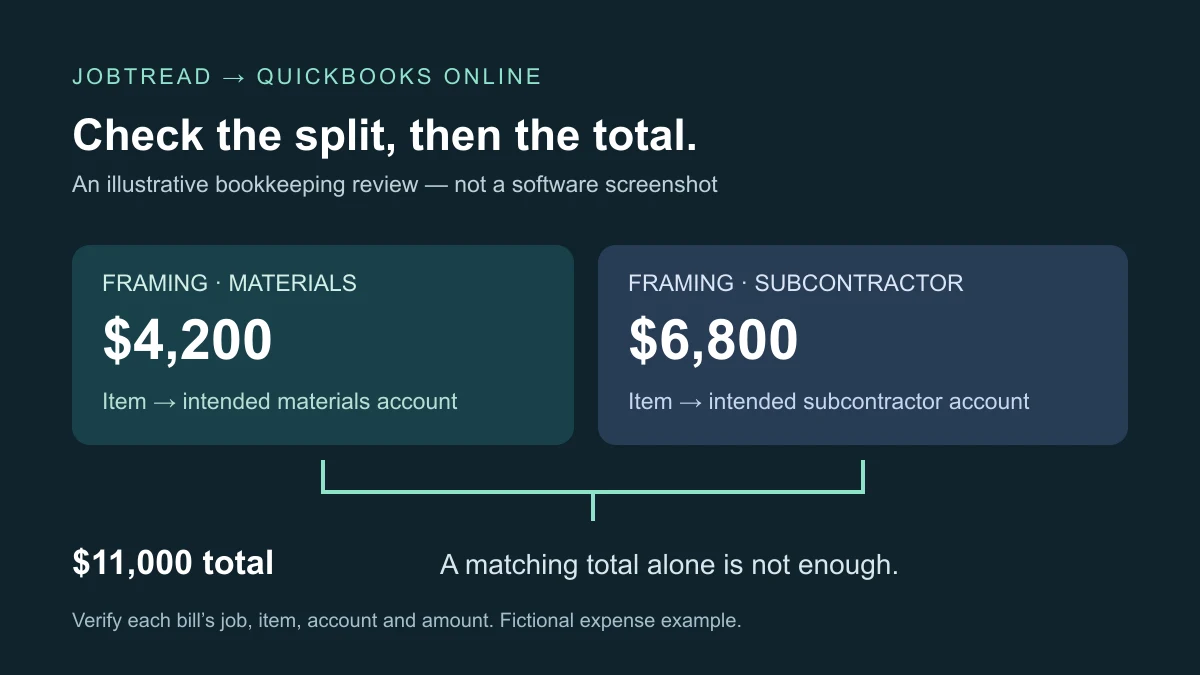
Assume a fictional remodel has two ordinary expense bills assigned to one framing code: $4,200 for materials and $6,800 for subcontractor work. Both are included in the same accrual-basis reporting period. There are no credits, taxes, retainage, inventory movements or capitalized amounts in this simplified exercise. The business’s accounting adviser has approved separate direct-cost accounts.
Scroll horizontally to read every column.
| Code / cost type | Proposed QBO item | Intended account | Sample result to verify |
|---|---|---|---|
| Framing / Materials | Framing materials | Direct materials | MAT-01: $4,200; record linked QBO ID and actual account |
| Framing / Subcontractor | Framing subcontractor | Subcontractor costs | SUB-01: $6,800; record linked QBO ID and actual account |
These are illustrative labels, not mandatory item names or a universal chart of accounts.
The total is $4,200 + $6,800 = $11,000. Suppose both bills instead reach the subcontractor account. The job total still equals $11,000, but materials show $0 and subcontractors show $11,000. That overstates the subcontractor category by $4,200 and understates materials by the same amount. A total-only check misses it.
Ask the provider to record the expected account, observed account, source and QuickBooks record IDs, amount, and pass or exception for each row. Compare the report using the same basis, dates and job filters. An unpaid bill may appear differently on cash- and accrual-basis reports; do not diagnose a mapping fault from unlike reports.
This example shows how to check the classification. Real materials may involve inventory, work in progress or other treatment outside this simplified expense example. Income-side item settings also need their own review. Ask your accounting adviser to settle those choices rather than applying these sample accounts to every transaction.
Keep future mapping and historical cleanup separate
A corrected setting is not proof that older records have been corrected. JobTread’s workflow documentation describes different behavior for creation, updates, voids and payments. Before changing a linked historical document, ask the provider to identify the applicable workflow and the result expected in each system.
JobTread: QuickBooks Online workflow
For existing errors, agree on a dated correction list and retain the before-and-after evidence privately. Include credits, paid documents, reconciled periods and tax-filed or closed periods in the scope discussion where applicable. Do not disconnect the integration, delete records or bulk-push unsynced documents as a first diagnostic step. Escalate unclear software behavior to product support and accounting treatment to your adviser.
What to include when hiring JobTread bookkeeping help
Request three separate deliverables: a documented configuration review, transaction-level validation, and a recurring bookkeeping plan. A quote that covers connecting the applications may not include investigating old duplicates, rebuilding job allocations or reconciling the bank. Conversely, monthly bookkeeping does not automatically include an integration rebuild.
Questions to put in the written scope
- Which jobs, periods and code/type combinations will you check, and why is that sample sufficient for this engagement?
- Will you inspect both item settings and actual posted account detail?
- Who approves accounting classifications and changes affecting closed periods?
- What evidence will I receive, and what remains outside the engagement?
- Who maintains the mapping when our team adds a cost code or changes a workflow?
The mapping review is complete when the agreed samples have the right job, item, account and amount, and every exception has a named owner and next action. Two passing samples demonstrate those paths only; they do not validate your entire integration or historical books.
For a discovery call with Daxable, describe the software, the job-cost split you need and one example of a report that does not make sense. Daxable can discuss the construction bookkeeping scope and the records needed to assess it. Confirm any JobTread configuration or historical cleanup deliverables in writing; this guide is not a claim of an official JobTread partnership or a completed test in your account.
Prepared with AI assistance and source checks. The example is fictional; no client outcome, personal testing or separate human review is claimed.
Sources
Frequently Asked Questions
Can one JobTread cost code use different QuickBooks items?
JobTread’s setup guide documents cost-type-specific mapping, which can route one cost code to different Products/Services. Check the settings for the actual code/type combinations used by your team.
Does a matching job total prove the mapping is correct?
No. In the fictional example, $4,200 of materials and $6,800 of subcontractor work still total $11,000 if both go to the subcontractor account. Verify classification and job assignment as well as the total.
Will changing the mapping fix all earlier bills?
Do not assume it will. Identify the affected documents and check the applicable sync behavior before making changes. Historical corrections need a defined scope and verification in both systems.
What should I ask a JobTread bookkeeper to deliver?
Ask for the mapping sheet, transaction-level sample results, unresolved exceptions and an ongoing review process. Specify whether configuration work, historical cleanup and monthly bookkeeping are included in the quote.