You may need Buildium and QuickBooks together when a separate company ledger solves a defined reporting, payroll-recording or CPA workflow need. You do not automatically need both. Buildium supports property and company accounting; the decision is whether another ledger adds useful coverage and whether your team can keep the records connected.
The point I want owners to understand is that operational visibility and the reports needed to close the books ask different questions. Knowing whether rent arrived is useful. So is knowing which company earned a fee, whether payroll is fully recorded and what the CPA needs at year-end. I would work backward from those needs before buying another tool.
What does Buildium already do for accounting?
Buildium publishes accounting tools for both properties and the management company. Its current product page describes property and company financials, and it also provides payment workflows and 1099 e-filing. It would be inaccurate to describe it as only an operations system or say it cannot hold company books.
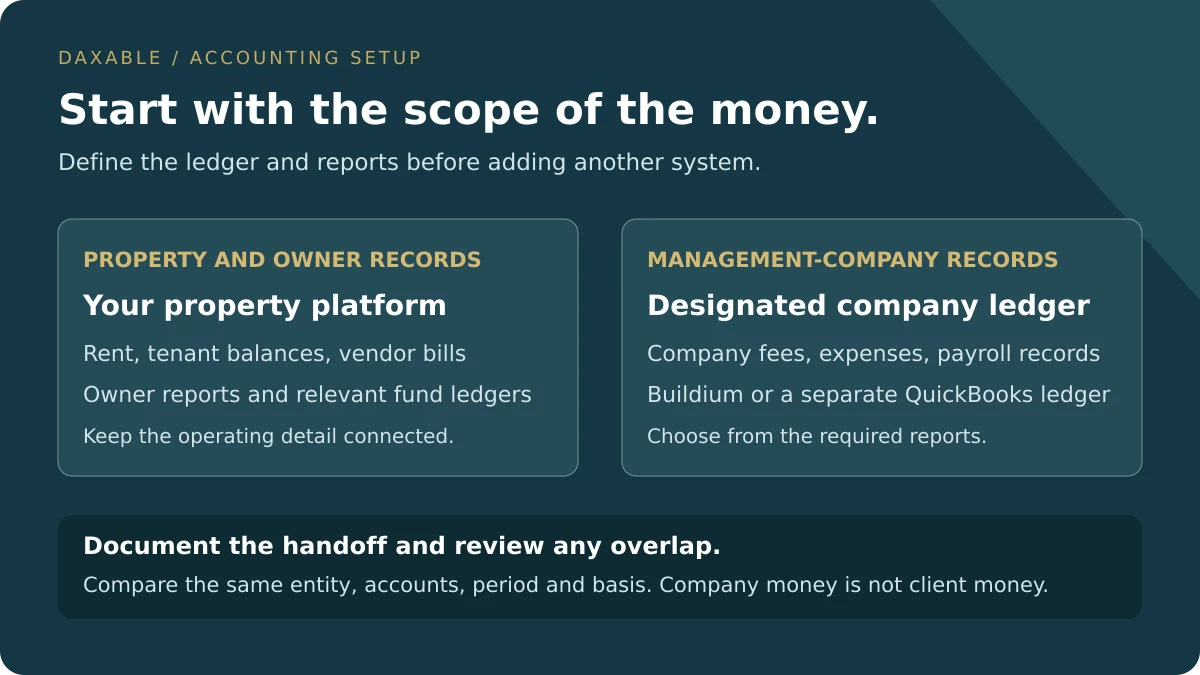
Your property platform connects the daily work: rent receipts, tenant balances, vendor bills, owner reports and maintenance activity. That context matters when you need to understand who paid, whose expense it is and what a proposed distribution represents. A separate general ledger does not replace that operating detail.
When is Buildium alone enough, and when can QuickBooks help?
I would compare two accounting setups against the same needs. This is a decision framework, not a claim that every feature or integration has been tested in your account. Review your actual plan, reports and provider workflow before choosing.
Scroll horizontally to read every column.
| Decision criterion | Buildium accounting alone | Buildium + QuickBooks company ledger |
|---|---|---|
| Best fit | Company reports and accounting workflow meet your needs | A defined company reporting or CPA workflow needs a separate ledger |
| Property operations | Rent, resident and owner records stay in Buildium | The same property work remains in Buildium |
| Company books | Use Buildium’s company accounting if it fits | Designate QuickBooks for the company; document overlap |
| Payroll records | Confirm how the payroll provider’s records reach the company ledger | Record supported payroll data in QuickBooks; processing is a separate responsibility |
| CPA handoff | Provide agreed reports and supporting schedules | Provide agreed QuickBooks reports plus property and supporting schedules |
| Ongoing work | Maintain one coherent accounting setup | Maintain both systems plus mapping and difference review |
| Reason to reconsider | Required output cannot be produced reliably | The extra ledger duplicates work without solving a clear gap |
Keep Buildium alone when it produces the required records and reports reliably. Add QuickBooks when a defined company-ledger need justifies the extra mapping, reconciliation and review.
Buildium’s own published guidance says some managers use both systems, while others find an all-in-one property application sufficient. My recommendation is to define the gap first. “Our CPA prefers a particular report and we can produce it reliably in QuickBooks” is a more useful reason than “every property manager needs two systems.”
What does your CPA need beyond an owner statement?
Your CPA may need complete entity-level financial statements, supporting balances, loan and closing records, and schedules for assets and adjustments. An owner statement answers a different reporting question. That does not make the underlying property records unimportant; they can support the amounts being reported.
For rental-property tax work, the IRS distinguishes repairs from improvements and explains how basis and depreciation affect reporting. A paid invoice is useful evidence, but it does not settle every tax-treatment question. Keep the documents and agree the treatment with the CPA instead of expecting the software label to decide it.
QuickBooks can be the company ledger you use for that handoff. Posting a transaction there does not by itself prepare a tax return or establish the correct tax depreciation. Equally, a CPA’s involvement does not make QuickBooks universally necessary. Ask what output they need and which system can support it.
Does Buildium process payroll, or just record payroll accounting?
I could not verify a native payroll-processing service in Buildium’s official public accounting documentation reviewed on October 4, 2026. Its published company accounting capability does not by itself establish wage calculation, withholding, employee payments or payroll filings. Confirm current availability and supported connections with Buildium before making that part of your setup.
Payroll processing and payroll bookkeeping are separate tasks. If another provider runs payroll, the designated company ledger still needs the supported expenses, liabilities and payments. Intuit documents how to record externally processed payroll in QuickBooks Online; those journal entries track accounting totals but do not create the employee W-2 data.
I would ask three practical questions: who runs payroll, who records it in the company books, and who checks the records against the provider reports and bank withdrawals? The answers matter more than assuming that paying for two accounting products covers all three jobs.
How do you decide whether to use both systems step by step?
Before deciding, list your legal entities, bank accounts, property platform, payroll provider and required reports. Bring a recent reconciled month, the unresolved items and your CPA’s requested output. Identify which books belong to the management company and which records concern properties or funds held for other people.
Six steps to choose a connected accounting setup
Separate the entities and the money
Write down whether you manage property for other owners, own rentals yourself, or do both. Assign the relevant company, property and bank accounts. Identify owner and tenant funds that require separate records.
Check: Every account and report has an identified entity and purpose; company income is distinguished from money held for others.
Ask the CPA what is actually missing
Ask for the reports, supporting schedules, accounting basis and year-end adjustments they need. Show the reports you can already produce from Buildium. Ask whether a separate ledger would solve a specific gap.
Check: You have a written list of required outputs and can explain which ones are already available and which still need work.
Choose the authoritative ledger for each entity
Decide whether Buildium’s company accounting covers the management company’s needs or whether QuickBooks should hold those company books. Keep the property records organized in the property platform. Document the role of any overlapping records.
Check: The team can identify the authoritative records for each entity and each transaction category without treating two competing ledgers as independently final.
Define the payroll handoff
Confirm which provider processes wages and filings. Agree how its reports, expenses, liabilities and bank withdrawals reach the designated company ledger. Ask about supported capabilities rather than assume an accounting entry processes payroll.
Check: Payroll processing and ledger recording have named owners, supporting reports and a reconciliation procedure.
Design the mapping before moving data
For each needed transfer or summary, document the entity, accounts, period, basis, supporting detail and reviewer. Identify where the transaction is first recorded and how a bank-feed item will be matched rather than duplicated.
Check: A sample mapping can be traced to source records and the team knows which transactions should not be copied into company income.
Test one completed month and agree the review rhythm
Use an authorized completed month to compare required reports, bank reconciliations and mapped overlapping records. Document timing items and approved adjustments. Agree who reviews exceptions and communicates what remains unresolved.
Check: The selected setup produces the agreed reports, any differences have supported explanations, and there is a named person and deadline for the next close.
The decision is complete when each entity has a designated ledger, each required report has a source, and each transfer or summary between systems has a documented preparation and review process. Your bookkeeper and CPA should understand the same plan.
If you cannot explain an opening balance, a duplicate transaction or the difference between company and client money, resolve that issue before adding a second ledger. A new subscription does not repair an unclear accounting structure.
What needs to match when you reconcile the records?
First, keep standard trust reconciliation clear. A three-way trust reconciliation compares the adjusted bank balance, the trust cash ledger and the total of the beneficiary or property ledgers for the relevant funds. The North Carolina Real Estate Commission explains this relationship in its trust-account guidance. Requirements and detailed records depend on your jurisdiction and business.
Comparing Buildium and QuickBooks is a separate cross-system check. Where they contain overlapping records, compare the same entity, accounts, period and accounting basis. Explain timing, mapping and approved adjustments. The management company’s cash or profit should not be forced to equal the client-property or tenant-funds balance.
When I talk about a triple tie-out between connected records, the scope must be defined. For example, a bank account, the corresponding Buildium records and an overlapping QuickBooks ledger could be compared for the same entity and period. That is a conditional example, not a substitute for the trust reconciliation that also establishes whose money is being held.
A company bank balance and a property trust balance can be different for a completely valid reason: they hold different money. An unexplained difference within the same mapped records is a different issue. Do not post a balancing entry simply to make two reports look alike; find the transaction, timing item or accounting adjustment that explains it.
How do you avoid duplicate entries and unclear handoffs?
Write down where each transaction starts. If the property platform records a management fee, decide which supported detail or summary reaches the company ledger and how the related bank movement is matched. Copying every rent receipt into the management company’s revenue would confuse money collected for owners with the company’s own earnings.
If you use an export, importer or connector, verify its actual scope, plan requirements and exception handling. I am not assuming a native Buildium–QuickBooks sync. Ask how duplicates, revised source transactions, historical changes and failed imports are detected. A manual handoff can still be disciplined when its mapping and review are clear.
Communication is part of that handoff. I would want one short close update: which records are complete, which differences remain, what decision is needed and when the next update is due. If the bookkeeper and CPA each believe the other person is fixing a balance, the software will not resolve that misunderstanding.
What is my recommendation for a property-management business?
Choose the people, records and review process together. A bookkeeper should be able to work inside Buildium and understand the company reporting requirements. QuickBooks knowledge is useful when it is part of your setup, but it does not replace proficiency in the property platform.
If Buildium covers your required accounting outputs, avoid adding a second ledger without a reason. If QuickBooks solves a defined company-bookkeeping or CPA handoff need, use both with a documented boundary and a repeatable close. The goal is useful reporting you can trust, with clear responsibility for the work.
Daxable can discuss the Buildium bookkeeping scope and any separately defined company-ledger work. Bring your reports, payroll-provider details, last reconciled month and CPA’s requirements. We can identify the work and handoff that your portfolio actually needs.
Sources
- Buildium: published property and company accounting
- Buildium: property-management software and QuickBooks needs
- Buildium: property and management-company accounting guide
- Intuit: recording externally processed payroll
- IRS: Publication 527 rental-property records and tax treatment
- North Carolina Real Estate Commission: three-way trust reconciliation (state-specific guidance)
Frequently Asked Questions
Do property managers need both Buildium and QuickBooks?
Some do; others do not. Buildium supports property and company accounting. Add QuickBooks when a defined company reporting, payroll-recording or CPA workflow need justifies a separate ledger and your team can maintain the mapping and reconciliation.
Can Buildium handle management-company accounting?
Yes. Buildium’s public accounting product page describes both property and company financials. Check whether its reports and your configured workflow cover the specific management-company outputs you need before adding another ledger.
Does Buildium have native payroll processing?
Native payroll processing was not verified in the official public accounting documentation reviewed for this guide. Confirm current availability with Buildium. Recording payroll expenses is different from calculating wages, withholding, paying employees and filing payroll forms.
Does my CPA require QuickBooks if I use Buildium?
Not automatically. Ask the CPA which reports, supporting schedules and adjustments they need, then check what your current setup can provide. QuickBooks may be a useful company ledger, but it is not a universal prerequisite for preparing property-business accounts.
What is the difference between trust reconciliation and a Buildium–QuickBooks tie-out?
Three-way trust reconciliation compares adjusted bank cash, the trust cash ledger and beneficiary-ledger totals. A Buildium–QuickBooks tie-out compares overlapping records for the same entity, accounts, period and basis. One does not automatically complete the other.
Should company balances equal the property trust balance?
No. They may represent different entities and different money. Reconcile each relevant account and compare only properly mapped overlapping records. Investigate unexplained differences rather than force company totals to equal owner or tenant funds.
Can I record external payroll in QuickBooks Online?
Yes. Intuit documents recording third-party payroll through supported journal entries. The entries track expenses, liabilities and payments, but do not create employee W-2 data. Agree the payroll-provider handoff and reconcile the records.
Will using two systems fix an unreconciled backlog?
A second system does not resolve an unexplained opening balance or missing source records. Define the entities, investigate the backlog and reconcile the records first. Then decide whether another ledger solves a specific ongoing reporting need.